

Ransomware attacks continue escalating in frequency and sophistication, making comprehensive protection essential for businesses and individuals. This guide explains how ransomware works, how to prevent infections, and what to do if you become a victim.
Understanding the Ransomware Threat
Protection begins with understanding what you're defending against. Ransomware is malicious software that encrypts your files and demands payment for decryption keys. Modern ransomware variants also steal sensitive data, threatening public release if victims refuse payment.
The ransomware threat has evolved from opportunistic attacks targeting individuals to sophisticated campaigns against businesses, healthcare facilities, schools, and government agencies. Average ransom demands now exceed $200,000 for small businesses, and downtime costs often exceed those amounts.
Effective ransomware protection requires multiple layers of defense because no single security measure provides complete protection against determined attackers.
How Ransomware Infects Systems
Understanding attack vectors helps implement targeted protection strategies. Common infection methods include phishing emails with malicious attachments, compromised websites distributing drive-by downloads, Remote Desktop Protocol (RDP) attacks exploiting weak credentials, software vulnerabilities in unpatched systems, and malicious advertisements on legitimate websites.
Phishing Remains the Primary Attack Vector
Despite awareness campaigns, phishing emails remain the most common method of ransomware infection. Attackers craft convincing messages impersonating trusted organizations, creating urgency that bypasses rational decision-making.
Modern phishing campaigns use social engineering techniques to research victims through social media and professional networks. Personalized attacks dramatically increase success rates, making comprehensive ransomware protection essential even for security-aware organizations.
RDP Exploitation
Remote Desktop Protocol allows legitimate remote access, but it becomes a vulnerability with weak security. Attackers scan the internet for exposed RDP services, then use brute-force attacks or stolen credentials to gain access.
Once inside through RDP, attackers disable security software, delete backups, and deploy ransomware. Strong protection includes securing or disabling unnecessary RDP access.
Essential Protection Strategies
Comprehensive Backup Solutions
Reliable backups represent your strongest protection. With clean backups, you can restore systems without paying ransoms. However, attackers increasingly target backup systems, making proper backup configuration critical.
The 3-2-1 Backup Rule
Maintain three data copies on two different storage types with one copy offsite. This ransomware protection strategy ensures attackers can't eliminate all backup copies before deploying ransomware.
Immutable and Air-Gapped Backups
Modern protection requires backups that attackers cannot modify or delete. Immutable backups remain unchangeable for defined retention periods, while air-gapped backups stay completely disconnected from networks except during backup operations.
Rotate external drives between online and offline states, keeping at least one backup completely disconnected. This simple ransomware protection measure defeats even sophisticated attacks targeting backup infrastructure.
Regular Backup Testing
Untested backups provide false security. Ransomware protection depends on verified recovery capabilities. Schedule quarterly restoration tests to confirm that backups actually work and contain the expected data.
Test different recovery scenarios, including individual file restoration, complete system recovery, and recovery to different hardware. Comprehensive testing ensures ransomware protection when needed most.
Email Security and Phishing Prevention
Since email is the primary attack vector, robust email security is critical for protection. Implement multiple defensive layers to reduce phishing success rates.
Advanced Email Filtering
Deploy email security solutions that scan attachments, analyze links, and detect spoofing attempts. Modern email filters use artificial intelligence to identify phishing indicators that humans might miss.
Quality ransomware protection includes sandboxing suspicious attachments in isolated environments, analyzing behavior before delivery. This prevents zero-day exploits from reaching users.
Security Awareness Training
Technical controls can't stop every phishing email, making user education essential. Regular security awareness training teaches employees to recognize suspicious emails, verify the authenticity of senders before clicking links, and report potential threats to IT departments.
Conduct simulated phishing campaigns, testing employee awareness and identifying individuals requiring additional training. Organizations with regular security training experience significantly fewer successful ransomware infections.
Network Segmentation
Network segmentation limits ransomware spread if initial infections occur. Properly segmented networks prevent breaches, preventing organization-wide encryption.
VLAN Implementation
Virtual Local Area Networks (VLANs) logically separate network traffic, creating security boundaries. Effective protection segments workstations, servers, security cameras, and guest networks onto separate VLANs.
Configure firewall rules between VLANs to allow only necessary traffic. Ransomware infecting a workstation cannot easily spread to servers if network segmentation prevents cross-VLAN communication.
Privileged Access Management
Limit administrative credentials to essential personnel and systems. Ransomware that gains access to administrative accounts causes the greatest damage by encrypting more systems and disabling security controls.
Strong ransomware protection includes separate administrative and standard user accounts, multi-factor authentication for privileged access, and regular reviews of administrative permissions, removing unnecessary access.
Endpoint Protection and EDR
Traditional antivirus software provides basic protection, but sophisticated attacks evade signature-based detection. Modern endpoint protection uses behavioral analysis to identify ransomware by actions rather than specific signatures.
Endpoint Detection and Response (EDR)
EDR solutions continuously monitor endpoint behavior, detecting suspicious activities characteristic of ransomware. These advanced ransomware protection tools identify attempts to encrypt files, unusual network connections, and credential theft.
EDR provides superior ransomware protection through real-time threat hunting, automated response capabilities that isolate infected systems, and forensic data that help understand attack chains.
Popular EDR solutions include CrowdStrike Falcon, SentinelOne, Microsoft Defender for Endpoint, and Carbon Black.
Patch Management
Unpatched vulnerabilities provide easy entry points for ransomware. Consistent patch management represents fundamental protection that many organizations overlook.
Prioritizing Critical Updates
Not all patches carry equal importance. Prioritize security updates for internet-facing systems, operating systems, web browsers, email clients, and commonly exploited applications like Adobe Reader and Java.
Deploy critical security patches within days of release. Attackers quickly weaponize newly disclosed vulnerabilities, making rapid patching essential ransomware protection.
Automated Patch Deployment
Manual patching proves unreliable as organizations grow. Automated patch management ensures consistent protection across all systems without relying on individual administrators to remember updates.
Use Windows Server Update Services (WSUS), Microsoft Endpoint Configuration Manager, or third-party patch management solutions providing automated deployment with appropriate testing and rollback capabilities.
Application Whitelisting
Application whitelisting provides powerful ransomware protection by allowing only approved applications to execute. This approach prevents ransomware execution even if it reaches systems through phishing or other vectors.
Windows AppLocker
Windows AppLocker enables organizations to control which applications run on managed computers. Strong protection using AppLocker requires defining rules for legitimate business applications while blocking everything else.
Implementation requires planning and testing, but provides excellent ransomware protection once properly configured. Start with audit mode, identifying normal application usage before enforcing restrictions.
Disabling Unnecessary Features
Every enabled feature represents a potential attack surface. Ransomware protection improves by disabling unnecessary functionality and reducing exploitable vulnerabilities.
Macro Security
Microsoft Office macros enable powerful automation but also facilitate ransomware delivery. Strong protection includes disabling macros by default, requiring explicit user approval for trusted documents only.
Configure Office to block macros from internet sources and display security warnings before enabling macros in documents from any source.
Script Execution
PowerShell, Windows Script Host, and other scripting engines provide legitimate functionality but also enable ransomware. Ransomware protection benefits from restricting script execution to signed scripts from trusted sources.
Many organizations completely disable Windows Script Host without impacting business operations while significantly improving ransomware protection.
Remote Desktop Protocol (RDP) Security
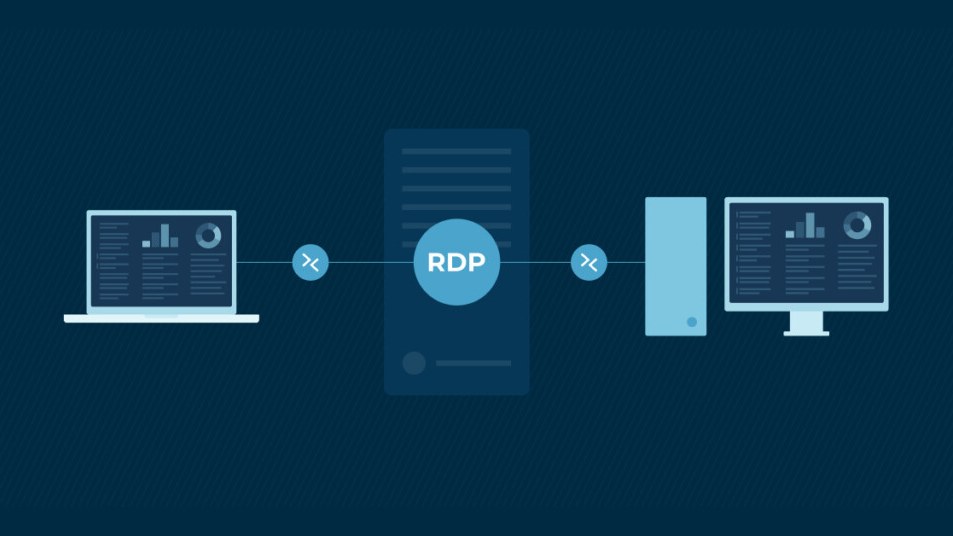
RDP vulnerabilities enable numerous ransomware infections. If your organization uses RDP for legitimate remote access, implement strong security measures as essential ransomware protection.
RDP Best Practices
Never expose RDP directly to the internet. Access RDP through VPN connections, providing an additional authentication layer. Require multi-factor authentication for RDP access, implement account lockout policies preventing brute-force attacks, and change RDP from the default port 3389.
Use Network Level Authentication (NLA), requiring authentication before establishing full RDP sessions. Monitor RDP logs for failed login attempts,s indicating attack attempts.
Consider replacing RDP entirely with a zero-trust remote access solution,s providing better security and audit capabilities.
Multi-Factor Authentication (MFA)
Multi-factor authentication significantly improves security by preventing account compromise even when passwords are stolen. MFA requires additional verification beyond passwords before granting access.
Implementing MFA Everywhere
Deploy MFA for email access, VPN connections, administrative accounts, cloud services, and remote access systems. Comprehensive MFA deployment provides strong ransomware protection against credential-based attacks.
Modern MFA solutions include smartphone apps, hardware tokens, biometric authentication, and SMS codes. Avoid SMS when possible due to SIM swapping vulnerabilities, preferring authenticator apps or hardware tokens for the strongest ransomware protection.
Incident Response Planning
Even with excellent ransomware protection, no organization achieves perfect security. Incident response planning prepares you for potential infections, minimizing damage and recovery time.
Creating Ransomware Response Procedures
Document specific procedures for ransomware incidents, including isolation steps preventing spread, communication protocols notifying stakeholders, backup verification confirming clean restoration points, and decision criteria regarding ransom payments.
Effective ransomware protection requires everyone to know their role during incidents. Conduct tabletop exercises simulating ransomware scenarios, testing response procedures, and identifying gaps before real incidents occur.
Isolation Procedures
Rapid isolation prevents ransomware from spreading throughout networks. Train IT staff and end users on immediate isolation steps when ransomware is suspected.
Disconnect infected systems from networks immediately, both wired and wireless. Disable network switches serving affected areas. Quick isolation represents critical ransomware protection, limiting the damage scope.
Should You Pay Ransoms?
Security experts and law enforcement discourage ransom payments because they fund criminal enterprises, don't guarantee data recovery, and mark you as willing to pay for future attacks.
However, organizations facing extinction-level data loss sometimes pay ransoms as a last resort. Strong ransomware protection, including reliable backups, eliminates this difficult decision by ensuring recovery without paying the ransom.
If considering payment, understand that approximately 40% of ransom payers never receive working decryption tools. Additionally, paying ransoms may violate sanctions laws if attackers operate from sanctioned countries.
Cyber Insurance Considerations
Cyber insurance provides financial protection against ransomware incidents, but doesn't replace proper ransomware protection. Insurance typically covers ransom payments, legal fees, notification costs, and business interruption losses.
Insurers increasingly require specific security measures before providing coverage. These requirements align with ransomware protection best practices, including multi-factor authentication, regular backups, endpoint protection, security awareness training, and incident response plans.
Review policy terms carefully, understanding coverage limits, exclusions, and deductibles. Cyber insurance complements but doesn't replace comprehensive ransomware protection.
Ransomware Decryption Tools
Sometimes ransomware protection fails,s and infections occur. Before considering a ransom payment, check for free decryption tools developed by security researchers.
No More Ransom Project
The No More Ransom initiative provides free decryption tools for numerous ransomware variants. Visit NoMoreRansom.org to search for decryptors matching your ransomware strain.
Not all ransomware has a decryptor available, but checking costs nothing and may save substantial ransom payments. This represents valuable last-resort ransomware protection when prevention fails.
Emerging Ransomware Threats
Ransomware constantly evolves, requiring adaptive ransomware protection strategies. Current trends include double extortion tactics, stealing data before encryption and threatening publication, ransomware-as-a-service platforms enabling less sophisticated criminals to launch attacks, and targeting of cloud infrastructure and services.
Supply Chain Attacks
Attackers increasingly compromise software vendors and managed service providers, using trusted relationships to deploy ransomware to multiple victims simultaneously. These supply chain attacks bypass traditional ransomware protection by using legitimate software distribution channels.
Protect against supply chain ransomware through vendor security assessments, monitoring vendor access to your systems, and maintaining isolated recovery environments that vendor compromise cannot reach.
Specific Ransomware Protection for Different Operating Systems
Windows Ransomware Protection
Windows systems face the most ransomware targeting due to market dominance. Essential Windows ransomware protection includes enabling Controlled Folder Access in Windows Security, protecting critical folders from unauthorized changes, using Windows Defender Application Guard to isolate untrusted websites and files, and enabling tamper protection to prevent malware from disabling security features.
Mac Ransomware Protection
While less common, Mac ransomware exists and is increasing. Mac ransomware protection includes keeping macOS up to date with the latest security patches, using Gatekeeper to block unsigned applications, and enabling FileVault encryption to protect data if devices are stolen.
Mobile Device Ransomware Protection
Smartphones and tablets are also vulnerable to ransomware threats. Mobile ransomware protection includes installing apps only from official app stores, keeping mobile operating systems up to date, and implementing mobile device management (MDM) for business devices.
Ransomware Protection for Different Organization Types
Small Business Ransomware Protection
Small businesses face particular ransomware risks due to limited IT resources and security expertise. Cost-effective small-business ransomware protection focuses on robust backup solutions, security awareness training, and managed security services that provide enterprise-level protection affordably.
Healthcare Ransomware Protection
Healthcare organizations face unique challenges due to patient safety concerns and strict compliance requirements. Healthcare ransomware protection must balance security with accessibility, ensuring clinical staff can quickly access critical patient information.
Medical devices often run outdated operating systems that cannot be patched, requiring network segmentation to isolate them from general networks.
Education Ransomware Protection
Schools and universities struggle with ransomware protection due to open network policies and limited budgets. Education ransomware protection emphasizes network segmentation, separating administrative systems from student networks, strict access controls for sensitive data, and comprehensive backup solutions.
Professional Ransomware Protection Assessment
Organizations uncertain about their ransomware protection posture benefit from professional security assessments. Cybersecurity professionals evaluate existing controls, identify vulnerabilities, and recommend improvements prioritized by risk and budget.
Professional assessments provide an objective evaluation of ransomware protection, identifying gaps that internal teams might overlook. Regular assessments ensure ransomware protection evolves with changing threats.
The Cost of Inadequate Ransomware Protection
Organizations skimp on ransomware protection at their peril. Average ransomware incident costs include ransom payments averaging $200,000 for small businesses, downtime costs often exceeding ransom amounts, recovery expenses for restoration and cleanup, reputation damage affecting customer trust, and regulatory fines if customer data is compromised.
Comprehensive ransomware protection proves far less expensive than recovery from successful attacks. Security investments represent insurance premiums preventing catastrophic losses.
Get Expert Ransomware Protection
At Blackhawk Computers, we help businesses implement comprehensive ransomware protection strategies tailored to specific risks and budgets. Our experienced security team provides ransomware protection assessment and planning, backup solution design and implementation, security awareness training programs, endpoint protection deployment and management, and incident response planning and exercises.
Don't wait until ransomware strikes—contact Blackhawk Computers today to strengthen your ransomware protection and safeguard your business from this devastating threat. Our team will assess your current security posture and implement effective ransomware protection measures, giving you peace of mind.
Blackhawk Computers is a master reseller for Sentinel One. SentinelOne, an AI-powered cybersecurity company, provides autonomous endpoint, cloud, and identity protection, replacing traditional antivirus with its Singularity Platform to prevent, detect, and respond to threats across an organization's entire digital footprint at machine speed, earning recognition as a leader in the field from analysts like Gartner.
Last updated: January 2026