

A professional small-business network setup lays the foundation for productivity, security, and scalability. This comprehensive guide covers everything from planning your network infrastructure to troubleshooting common connectivity issues.
Why Professional Small Business Network Setup Matters
A properly designed small business network setup ensures reliable connectivity, protects sensitive data, supports growth, and minimizes downtime. Poor network design leads to connectivity problems, security vulnerabilities, and expensive emergency repairs.
Small business network setup differs significantly from home networking. Businesses require greater reliability, security, scalability, and performance to support operations effectively.
Planning Your Small Business Network Setup
Assessing Network Requirements
A successful small business network setup begins with a thorough requirements assessment. Consider current needs and anticipated growth when planning infrastructure.
User and Device Count
Calculate total users and devices requiring network access. Include computers, laptops, smartphones, tablets, printers, security cameras, and Internet of Things (IoT) devices. Plan a small business network setup with 30-50% capacity above current requirements to accommodate growth.
Bandwidth Requirements
Different business activities demand varying bandwidth levels. Video conferencing, cloud application usage, file sharing, and backup operations all consume significant bandwidth. Adequate small-business network setup provisions ensure sufficient bandwidth for simultaneous peak usage.
Coverage Area
Physical office layout significantly impacts small business network setup decisions. Multi-floor offices, thick walls, and large open areas all require specific equipment placement and wireless access point deployment.
Choosing Internet Service

Internet connectivity is the foundation of a modern small-business network setup. Select service providers and plans that support your bandwidth requirements and offer reliability appropriate for business operations.
Business Internet vs. Residential Service
Business internet plans typically provide guaranteed upload and download speeds, better reliability, static IP addresses, and priority support. While more expensive than residential service, these advantages justify the cost for a serious small business network setup.
Redundant Internet Connections
Critical business operations benefit from redundant internet connections using different providers or technologies. Failover capabilities in a professional small business network setup minimize downtime when primary connections fail.
Essential Small Business Network Components
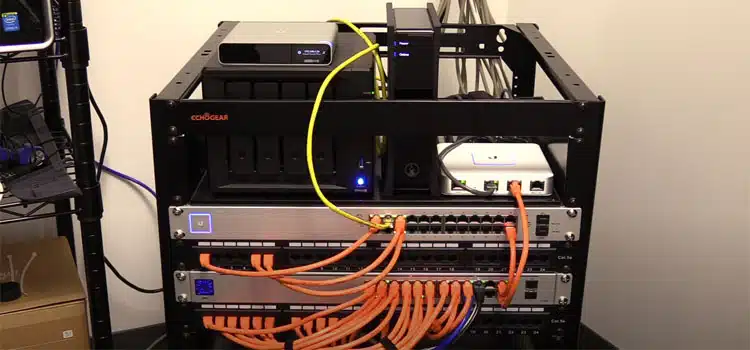
Business-Grade Router
Consumer routers lack the features and reliability required for a small-business network setup. Business routers provide advanced security features, quality of service (QoS) controls, VLAN support, and robust hardware surviving constant operation.
Recommended business router brands include Cisco, Ubiquiti, Mikrotik, and TP-Link Omada. These manufacturers design equipment specifically for commercial environments, with appropriate network setup requirements for small businesses.
Network Switches
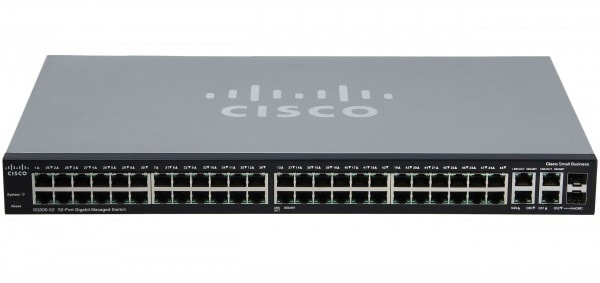
Network switches connect wired devices in your small business network. Unmanaged switches provide basic connectivity, while managed switches enable advanced features like VLANs, port mirroring, and traffic prioritization.
Choosing Switch Capacity
Select switches with sufficient ports for current devices plus expansion capacity. Gigabit switches are the minimum standard for modern small-business network setups, with 10-gigabit uplinks available for high-performance requirements.
Power over Ethernet (PoE) switches simplify small-business network setup by powering devices like wireless access points, IP phones, and security cameras over network cables, eliminating the need for separate power supplies.
Wireless Access Points
Professional wireless access points provide superior coverage, performance, and management compared to consumer routers. A properly configured small-business network setup provides multiple access points for comprehensive wireless coverage.
Access Point Placement
Strategic placement of access points ensures complete wireless coverage throughout the business premises. Conduct site surveys identifying dead zones and interference sources before finalizing the small business network setup.
Mount access points centrally within coverage areas, avoid physical obstructions, and maintain appropriate spacing between units to prevent interference while ensuring seamless roaming.
Wi-Fi 6 and Wi-Fi 7
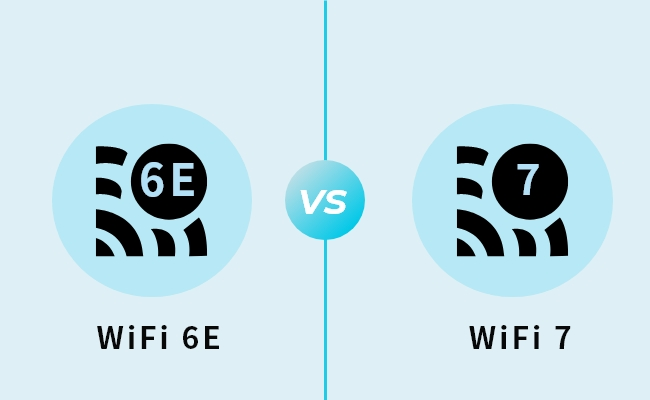
Modern small-business network setups should use Wi-Fi 6 (802.11ax) or newer Wi-Fi 7 access points. These standards provide dramatically improved performance, especially in dense device environments common in business settings.
Network Security Appliances
Dedicated firewall and security appliances protect a small business network setup from cyber threats. While consumer routers include basic firewall features, business-grade security appliances provide comprehensive protection. We highly suggest using Meraki Firewalls.
Unified Threat Management
Unified Threat Management (UTM) appliances combine firewall, intrusion prevention, antivirus, content filtering, and VPN capabilities into a single integrated security platform. UTM devices streamline small business network setup while providing enterprise-grade protection.
Popular UTM solutions for small-business network setups include Fortinet FortiGate, Sophos XG Firewall, and pfSense-based appliances.
Network Topology and Design
Star Topology for Small Businesses
Most small-business network setups use a star topology, in which all devices connect to a central switch or access point. This design simplifies troubleshooting, provides straightforward scalability, and isolates device failures.
Network Segmentation
A proper small business network setup segregates traffic using VLANs or physical network separation. Common segments include employee workstations, guest Wi-Fi, security cameras, VoIP phones, and servers.
Network segmentation enhances security by limiting lateral movement if attackers compromise individual devices. It also improves performance by isolating bandwidth-intensive traffic.
IP Address Planning
Structured IP address planning simplifies the setup, management, and troubleshooting of small business networks. Use private IP address ranges (typically 192.168.x.x or 10.x.x.x) for internal networks.
Static vs. Dynamic IP Addresses
Servers, printers, security cameras, and other infrastructure equipment should be assigned static IP addresses for consistent accessibility. End-user devices can use DHCP-assigned addresses, simplifying the management of small business networks.
Reserve IP address ranges for different device categories. For example, 192.168.1.1-50 for infrastructure, 192.168.1.51-100 for printers and servers, and 192.168.1.101-254 for workstations.
Implementing Network Security
Security represents the most critical aspect of a small business network setup. Compromised networks lead to data breaches, ransomware infections, and business disruption.
Firewall Configuration
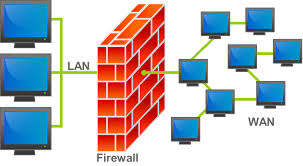
Properly configured firewalls block unauthorized access while permitting legitimate business traffic. A small business network setup should include firewall rules tailored to business requirements rather than relying on default settings.
Implement least-privilege access policies, block unnecessary outbound connections, and regularly review firewall logs for suspicious activity.
Wireless Network Security
Secure wireless networks using WPA3 encryption when supported by all devices, or WPA2 as a minimum. Never use WEP or open networks in a small business network setup.
Guest Network Isolation
Separate guest wireless networks prevent visitors from accessing internal business resources. A professional small business network setup isolates guest traffic using VLANs or separate internet connections.
Configure guest networks with bandwidth limitations, content filtering, and time-based access restrictions as appropriate for your business environment.
VPN Access for Remote Workers
Virtual Private Networks (VPN) enable secure remote access to business resources. Small business network setup should include VPN services for employees working remotely or traveling.
Modern VPN solutions include SSL VPNs, site-to-site VPNs for connecting multiple locations, and zero-trust network access (ZTNA) platforms for enhanced security.
Network Monitoring and Management
Proactive network monitoring identifies problems before they impact operations. A professional small business network setup includes monitoring tools that track network performance, device status, and security events.
Network Management Systems
Network management platforms provide centralized visibility into infrastructure health. Cloud-based management simplifies small business network setup by eliminating on-premises management servers.
Ubiquiti UniFi, Cisco Meraki, and TP-Link Omada offer cloud management platforms suitable for small business network setups, providing remote configuration, firmware updates, and performance analytics.
Performance Monitoring
Monitor bandwidth utilization, latency, packet loss, and device uptime to identify performance bottlenecks. Regular performance reviews ensure the small business network setup continues meeting operational requirements as usage patterns evolve.
Common Network Problems and Solutions
Slow Network Performance
Slow network performance frustrates users and reduces productivity. Common causes of issues in small-business network setups include insufficient bandwidth, outdated equipment, excessive wireless interference, malware infections, and misconfigured QoS settings.
Systematic troubleshooting identifies root causes. Test connection speeds at various points throughout the network, check for bandwidth-consuming applications, and verify equipment specifications meet current requirements.
Intermittent Connectivity
Intermittent connectivity is particularly challenging to diagnose in a small-business network setup. Potential causes include failing hardware, electromagnetic interference, overheated equipment, or IP address conflicts.
Monitor affected devices and network equipment for patterns. Connectivity issues occurring at specific times may indicate scheduled tasks or external interference sources.
Wi-Fi Dead Zones
Physical obstacles, distance from access points, and interference create wireless dead zones. Resolve coverage gaps by installing additional access points, repositioning access points, or adjusting transmit power and channel selection.
Conduct wireless site surveys using professional tools, identifying optimal access point placement to ensure complete coverage for a small business network setup.
DNS Resolution Problems
DNS issues prevent devices from accessing internet resources despite functional network connectivity. Verify DNS server configuration in a small business network setup, test with alternative DNS servers like Google (8.8.8.8) or Cloudflare (1.1.1.1), and check firewall rules permitting DNS traffic.
Structured Cabling Best Practices
Professional structured cabling improves reliability and simplifies maintenance in a small-business network. Proper cable installation pays dividends through years of trouble-free operation.
Cable Category Selection
Use Cat6 or Cat6a cabling as the minimum standard for new small-business network installations. These categories support gigabit speeds with sufficient headroom for 10-gigabit upgrades.
Avoid Cat5e for new installations despite its lower cost. The minimal savings don't justify the performance limitations as network demands increase.
Cable Management
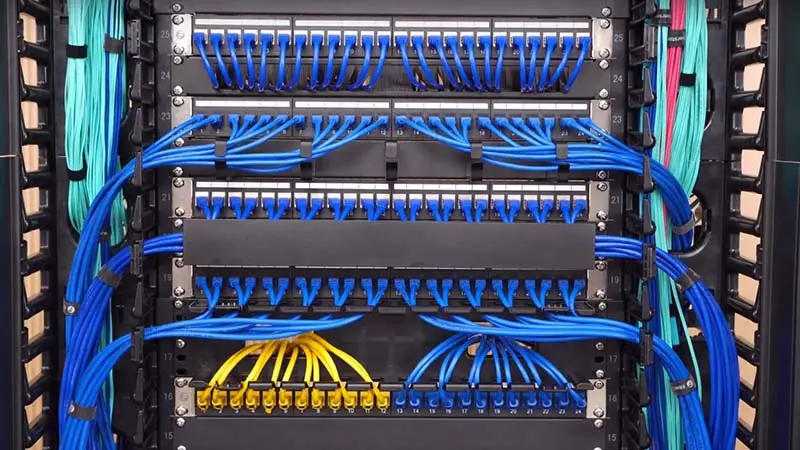
Organized cable management prevents accidental disconnections, simplifies troubleshooting, and maintains a professional appearance. Use cable trays, labels, and color-coding in the small-business network setup.
Maintain separation between network and power cables to prevent electromagnetic interference. When cables must cross, do so at a perpendicular angle,s minimizing interference.
Testing and Certification
Test all cable runs during small business network setup installation using professional cable certifiers. Certification verifies cables meet specification requirements and identifies installation defects before deployment.
Voice over IP (VoIP) Integration
Modern small-business network setups often include VoIP phone systems replacing traditional landlines. Proper network configuration ensures call quality and reliability.
QoS Configuration for VoIP
Voice traffic must be prioritized over less time-sensitive data. Configure Quality of Service (QoS) in a small-business network, prioritizing VoIP packets to minimize latency and jitter.
Dedicate specific VLANs to VoIP traffic, separating voice from data networks. This segmentation simplifies traffic management and enhances security.
Bandwidth Reservation
Reserve sufficient bandwidth for VoIP calls in a small business network setup. Each VoIP call consumes approximately 100 Kbps of bandwidth. Calculate maximum simultaneous calls and provision accordingly with additional capacity for overhead.
Cloud Integration Considerations
Cloud services are increasingly forming the core of business infrastructure. Small business network setup must provide reliable, high-performance cloud connectivity.
Optimizing Cloud Performance
Ensure sufficient upload bandwidth for cloud-based applications. Unlike traditional internet usage, which emphasizes downloads, cloud services require robust upload capacity for file synchronization, backups, and application data.
Consider SD-WAN solutions for a small business network to optimize traffic routing for cloud applications, potentially bypassing congested internet links.
Disaster Recovery and Business Continuity
Network infrastructure failures disrupt operations. A comprehensive small business network setup includes redundancy and recovery planning to minimize downtime.
Equipment Redundancy
Critical network components benefit from redundancy. Redundant internet connections, backup power supplies, and spare equipment minimize recovery time when failures occur.
Maintain documented configurations for the small business network, enabling quick restoration or reconfiguration during emergencies.
Regular Backups
Backup network device configurations regularly. Many business networking equipment supports automated configuration backups to cloud storage, simplifying disaster recovery in a small business network setup.
Scaling Your Network
Successful businesses outgrow initial network infrastructure. Plan a small-business network setup with scalability in mind, enabling growth without major redesigns.
Modular Design
Modular network design allows incremental expansion. Additional switches stack with existing infrastructure, extra access points join wireless networks seamlessly, and bandwidth upgrades occur without disrupting operations.
Capacity Planning
Regularly assess network capacity against current usage. When utilization consistently exceeds 70% of capacity, plan upgrades before performance degrades. Proactive capacity management in a small business network setup prevents emergency upgrades during critical business periods.
Documentation and Labeling
Comprehensive documentation is invaluable for troubleshooting, maintenance, and the expansion of a small business network. Document network topology, IP address assignments, equipment configurations, wireless channel assignments, and VLAN configurations.
Label all cables, ports, and equipment, identifying their purpose and connections. Future technicians (or you months later) will appreciate clear documentation during troubleshooting or modifications.
Professional Network Installation
While technically inclined individuals can implement a basic small-business network setup, a professional installation offers advantages, including properly structured cabling, optimized equipment placement, security configuration in line with best practices, and warranty protection.
Professional installers bring experience from hundreds of small business network setup projects, anticipating challenges and implementing proven solutions rather than learning through trial and error.
When to Upgrade Your Network
Technology evolves rapidly. Indicators suggesting upgrades to the small business network setup include equipment older than 5 years without security updates, insufficient bandwidth for current operations, frequent connectivity issues, or expansion beyond current infrastructure capacity.
Budget for regular infrastructure refreshes and for maintaining modern, supportable equipment. Proactive upgrades cost less than emergency replacements and avoid business disruption.
Get Expert Small Business Network Setup
Blackhawk Computers specializes in professional small-business network setup, providing reliable, secure, and scalable infrastructure to support your business operations. Our experienced technicians design and implement network solutions tailored to your specific requirements and budget.
We handle every aspect of small business network setup, including requirements assessment and design, equipment procurement and installation, configuration and security hardening, testing and optimization, and ongoing support and monitoring.
Whether you're establishing new office space, upgrading aging infrastructure, or experiencing network problems, our team delivers professional small business network setup, ensuring your technology infrastructure supports rather than hinders your business success.
Last updated: January 2026